
Best Bluetooth scanner app for Android: four jobs, four apps
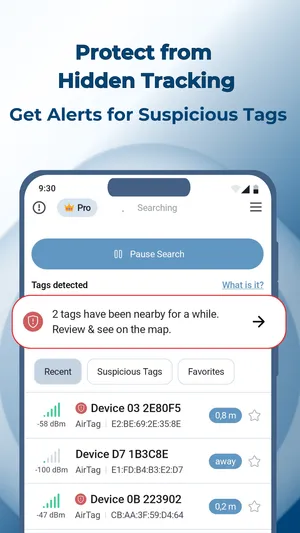
All four apps here are Android apps from DreamTeam Mobile, and each scans for a different thing — TFind covers AirTag, SmartTag and Tile.
Updated October 6, 2026 · Published August 20, 2026
 Free to download · Android 8.0+ · contains ads & optional Pro (subscription or one-time)
Four different scanning jobs on Android, four different answers. People arrive at a tracker detector wanting one of these, and installing the wrong one is the fastest way to conclude that Android “cannot” do the thing.
| What you want to find | The app for it | What it reads |
|---|---|---|
| A tracker — AirTag, SmartTag or Tile — near you, or following you | TFind | Those three tracker broadcast formats |
| AirPods or an AirPods case | AFind | AirPods specifically |
| Any Bluetooth device in range — earbuds, watch, speaker, band | UFind, or UFind Lite for a faster, ad-free scan | Every Bluetooth advertisement nearby |
| A hidden camera in a hotel room or rental | CFind | Wi-Fi, Bluetooth and infrared |
All four are Android apps from DreamTeam Mobile, the publisher of TFind.
Trackers: TFind
- TFind detects three tracker families: Apple AirTag, Samsung SmartTag and SmartTag+, and Tile.
- TFind shows only those three families. It does not list other Bluetooth devices.
- TFind estimates how close each tracker is.
- TFind warns you when the same unknown tracker keeps appearing as you move.
- Use TFind for one question: is a tracker on me, in my bag or in my car?
- Do not use TFind for a list of every Bluetooth device in the room.
- The full coverage rule, and what TFind cannot see, is on which trackers TFind detects.
AirPods: AFind
- An AirPod is not a Find My tag and does not broadcast like one.
- TFind does not detect AirPods.
- AFind is the DreamTeam Mobile app for AirPods, AirPods Pro and the AirPods case.
- AirPods appear next to AirTags in Apple’s Find My because of the Apple account, not because of a Bluetooth signal an Android app can read.
Every Bluetooth device: UFind and UFind Lite
- UFind lists every Bluetooth device it can hear: headphones, watches, fitness bands, speakers and phones.
- UFind Lite does the same job, built for speed.
- UFind Lite starts the scan when the app opens, with no ads and no sign-up.
- UFind’s distance meter and its free-vs-Pro split are on the UFind page.
- A common review complaint is “another app found twenty devices and this one found two”. Both apps were correct.
- A general scanner lists every device. A tracker detector decodes only tracker formats. If you want the long list, use a general scanner.
Hidden cameras: CFind
- A hidden camera is a different sensor problem from a Bluetooth tracker.
- CFind scans over Wi-Fi, Bluetooth and infrared.
- A camera is not a Bluetooth tracker, so a Bluetooth-only scan does not find one.
- A tracker app that also claims camera detection usually gives false confidence about both.
What none of them can do
- Bluetooth sets the limit for all four apps.
- Bluetooth range is roughly 5 to 10 metres, and walls block it.
- All four apps estimate distance from signal strength. The distance is an estimate, not an exact measurement.
- A device that is not broadcasting cannot be found by any app, on any phone.
About missing star ratings
- Google Play does not yet show a star rating for UFind Lite, because the app is new.
- A missing rating is a fact about an app’s age, not about its quality.
- AFind had no rating here in August 2026 and has one now.
What works on Android — and what doesn't
Works on Android
- Sorts four different Android scanning jobs so you install the one that answers your question
- States plainly which job TFind is wrong for, instead of stretching it to cover all four
- Explains why a tracker detector shows a short list and a general scanner shows a long one
Honest limits
- No single app here does all four jobs, and any app claiming to is worth a second look
- One of the apps here is new enough that Google Play shows no star rating for it yet
- Every app on this page is limited by Bluetooth itself — roughly 5 to 10 metres, blocked by walls
On iPhone? These are all Android apps. On iPhone, Apple's built-in tracker detection covers the tracker case; the others have no iPhone equivalent here.
FAQ
- Which Android app detects AirTags and other trackers?
- TFind. It decodes three tracker families — Apple AirTag, Samsung SmartTag and SmartTag+, and Tile — and alerts you when the same unknown tracker keeps appearing near you.
- Which Android app finds AirPods?
- AFind, which targets AirPods and AirPods Pro including the case. TFind does not detect AirPods, because an AirPod does not broadcast a Find My tag advertisement.
- I want to see every Bluetooth device around me, not just trackers. Which app?
- UFind, or UFind Lite if you want it faster and without ads. Both list any Bluetooth device in range. TFind deliberately shows only the three tracker families, which is why its list is much shorter.
- Which app scans for hidden cameras?
- CFind, which looks for hidden cameras over Wi-Fi, Bluetooth and infrared. That is a different sensor problem from Bluetooth tracker detection, so it is a different app rather than a mode inside TFind.
- Why not put all of this in one app?
- Because the four jobs need different scans and produce different answers. Bundling them makes every result noisier, which is the usual reason a tracker detector shows twenty devices and none of them is a tracker.