
UFind: find a lost Bluetooth device on Android
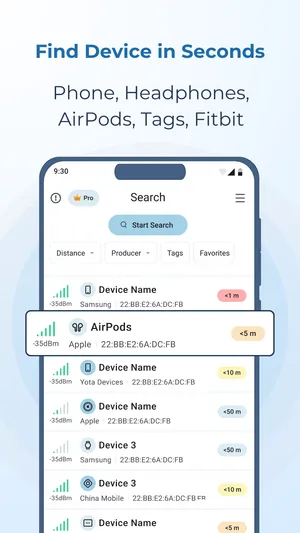
UFind is an Android app for Android 8.0 or newer. It scans Bluetooth and Bluetooth Low Energy and lists every device it can hear, with an estimated distance.
Updated September 29, 2026
 UFind · free to download · contains ads & optional Pro
UFind is the Android app for finding a lost Bluetooth device. Open it, start a scan, and it lists the earbuds, headphones, watches, phones and speakers it can hear, each with an estimated distance. Pick yours and walk: the meter goes from cold to hot as you get closer. The scan is free, with ads.
What UFind finds
UFind listens for both kinds of Bluetooth at once — Bluetooth Classic, which older headphones and car kits use, and Bluetooth Low Energy, which most earbuds, watches and tags use. It reads each device’s Bluetooth class, so the list says headphones, smartwatch or speaker rather than a bare code. Health devices such as a heart-rate monitor or a smart scale show up too.
Your paired devices sit in their own section, apart from everything else in range. Devices you can hear right now go to the top.
How to find a lost Bluetooth device with UFind
- Start a scan and give it a few seconds.
- Find your device in the list. The brand and the distance help when several look alike.
- Open it. The meter has five bands, from under 1 m out to about 75 m.
- Walk slowly and watch the colour. Blue is far; red is close.
- When you have it, tap I found it. UFind saves the find to History.
The distance is an estimate from signal strength. If the reading jumps, stand still for a moment, then move a few steps and look again.
Free or Pro
| Free (with ads) | Pro | |
|---|---|---|
| Scan and device list | ✓ | ✓ |
| Hotter-colder distance meter | ✓ | ✓ |
| History, favourites, hide and rename | ✓ | ✓ |
| Left-behind alert | ✓ | ✓ |
| Last-seen map | — | ✓ |
| Brand and tag filters | — | ✓ |
| No ads | — | ✓ |
UFind and TFind are different tools
UFind lists every Bluetooth device in range, because you are looking for one of your own. TFind shows only trackers — Apple AirTag, Samsung SmartTag and Tile — because its job is to tell you whether someone else’s tag is following you. If a scan in TFind looks short, that is why; the full list is UFind’s job. More on picking the right scanner is in the guide to Bluetooth scanner apps for Android.
What works on Android — and what doesn't
Works on Android
- Scans Bluetooth Classic and Bluetooth Low Energy together, so older headphones and newer earbuds both show up in one list
- Each device shows its name, brand, signal strength and an estimated distance, with your paired devices listed apart from everything else
- A hotter-colder meter on the device screen: five bands from under 1 m out to about 75 m, turning from blue to red as you get closer
- Tap 'I found it' to save the find to History; hide devices you do not care about and rename the ones you do
- An optional left-behind alert for your paired and favourite devices: if one goes quiet for 1 to 30 minutes, UFind notifies you
Honest limits
- UFind finds a device only while it is switched on and transmitting. A flat battery means there is nothing to hear
- Distance comes from signal strength, so walls, glass and mirrors skew it. Read it as warmer or colder, not as a tape measure
- It cannot make earbuds, headphones or a watch ring. Play Sound works on AirTags only, and Apple blocks it while the owner's device is near
- The last-seen map is a Pro feature. It shows where your phone was when it last heard the device, not a GPS fix from the device itself
On iPhone? UFind is Android-only. On an iPhone, Apple's Find My app locates AirPods and other Apple devices signed in to your Apple ID.
FAQ
- What is the UFind app?
- UFind is an Android app from DreamTeam Mobile, the makers of TFind. It scans for Bluetooth devices around you, lists them with an estimated distance, and guides you to the one you lost with a hotter-colder meter. It works on Android 8.0 or newer.
- Is UFind free?
- UFind is free to download and the scan is free, with ads. The distance meter, History, favourites and the left-behind alert are free too. Pro removes the ads and adds the last-seen map, brand and tag filters, and more AirTag sound plays. Pro is a weekly, monthly or yearly subscription, or a one-time lifetime purchase.
- Can UFind find my AirPods?
- Yes, when they are out of the case and switched on. UFind lists AirPods with an estimated distance, and the meter tells you when you are getting closer. It cannot play a sound on AirPods. For AirPods specifically, including the case, DreamTeam Mobile makes AFind.
- UFind or TFind — which one do I need?
- Use UFind to find something you own and lost: earbuds, headphones, a watch, a phone. Use TFind to check whether someone else's tracker is following you — it looks for unknown AirTags, SmartTags and Tile tags and warns you when one keeps turning up. Both are Android apps from DreamTeam Mobile.
- Why does UFind ask for location?
- Android needs the Bluetooth permission to scan, and UFind uses location to record where your phone was when it last heard a device. That is what the last-seen map shows. On Android 12 and newer the Bluetooth scan itself is declared as not used for location.