
How to find a hidden AirTag in your car with an Android phone
TFind is an Android app that scans a car for a hidden Apple AirTag, Samsung SmartTag or Tile over Bluetooth.
Updated September 15, 2026 · Published August 21, 2026
 Free to download · Android 8.0+ · contains ads & optional Pro (subscription or one-time)
An Android phone can scan your car for a hidden Bluetooth tracker, and TFind does it free. It reads Apple AirTag, Samsung SmartTag and Tile broadcasts on any Android 8.0+ phone. No dongle, no scanner hardware.
Read the honest limit first, because it decides whether this page helps you: a GPS or cellular tracker wired into a car is invisible to every Bluetooth app, including this one. If that is what you are worried about, a Bluetooth scan will not settle it. TFind finds the consumer tags people actually drop into a car — an AirTag in the trunk liner, a Tile under a seat.
How to scan a parked car
- Open TFind and tap Start Scan — grant Bluetooth and Location so scanning can run.
- Scan from the driver’s seat, then the back seat, then the trunk.
- Step outside and scan again at each corner of the car, close to the body.
- Watch the distance band on anything unfamiliar and move toward it.
- Mark tags you own as My Tags so they stop triggering alerts.
Several short scans from different spots beat one long scan from one seat. A car is a metal box: sheet metal blocks and reflects Bluetooth, and Bluetooth only reaches about 5-10 m to begin with.
Be patient with a quiet result. A separated AirTag rebroadcasts roughly every 15 minutes, so a tracker can be present and simply not talking at the moment you looked. Scan, wait, scan again.
Why driving is the strongest test
This is the part worth knowing, and it inverts the usual advice.
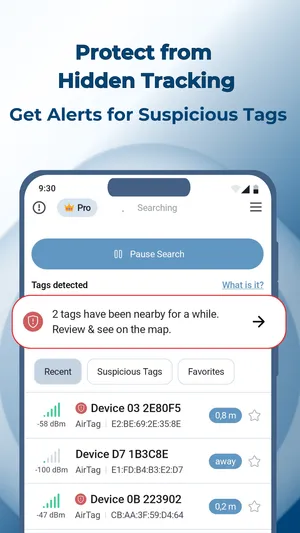
TFind flags a tracker as suspicious only after it sees the same one at least twice, 15 minutes and 200 metres apart. That threshold is deliberately hard to trip, because the interesting signal is a tracker that travels with you rather than one you walked past.
On foot, that bar is rarely cleared. In a car it is cleared by an ordinary errand. So the strongest way to answer “is something tracking my car?” is not a single sweep of the parked car — it is to run TFind while you drive, and let the alert do what it was built for.
Background scanning needs the scan left running with its notification visible, which costs battery. On a drive, that is a fair trade.
What a detected tracker does and does not mean
A tracker in range is not proof that someone is tracking you. Car parks are full of other people’s tags, and a tag in the next vehicle is well within Bluetooth range.
What matters is repetition. The same unfamiliar tracker, appearing again after you have driven somewhere else, is the pattern worth acting on. That is the pattern the alert looks for.
TFind cannot tell you who owns a tracker it found. A Bluetooth advertisement carries no owner identity, so no app can.
What this scan cannot do
- Wired GPS and cellular trackers — invisible over Bluetooth, as above.
- Anything outside the three families — Chipolo, Pebblebee, an iTag or other no-brand keyring tag, and tags on Google’s Find Hub network are not detected at all. The full rule is on which trackers TFind detects.
- Pinpointing a location — there is no ultra-wideband precision finding, so the distance band narrows a search area and never points at a spot.
- A tag that is not broadcasting — a dead battery or a tag in pairing mode is silent, and silence cannot be scanned.
Related pages
- Detect hidden Bluetooth trackers on Android — the general anti-stalking case
- Bluetooth tracker detection while travelling — hotel rooms and rental cars
- Find a nearby AirTag on Android
- Which trackers TFind detects
What works on Android — and what doesn't
Works on Android
- Scans a parked car for AirTag, SmartTag and Tile — from the driver's seat, the back seat and outside the car
- Driving is what makes the alert work: a tracker riding with your car clears the 15 minute and 200 metre test on an ordinary trip
- Gives each tracker a distance band, so you can narrow a search to the cabin, the trunk or a wheel arch
- Runs on any Android 8.0+ phone, with no dongle and no scanner hardware
Honest limits
- A hardwired GPS or cellular vehicle tracker is invisible here — TFind reads Bluetooth trackers only, and no Bluetooth scan of any kind can find a wired one
- A car is a metal box that blocks and reflects Bluetooth, so one scan from one seat does not cover the whole car
- An AirTag sitting with its owner stays nearly silent, so a tracker whose owner is standing next to your car is the hardest case
- The distance band gets warmer and colder; it never points, so it narrows a search area rather than finding the exact spot
On iPhone? TFind is Android-only. On iPhone, Apple's built-in tracker detection warns about Find My tags travelling with you.
FAQ
- How do I check my car for a hidden AirTag with an Android phone?
- Open TFind, grant Bluetooth and Location, and tap Start Scan. Scan from the driver's seat, then the back seat, then standing outside at each corner of the car. Bluetooth reaches roughly 5-10 m and the car's body blocks it, so several short scans from different spots beat one long scan from one seat.
- Can TFind find a GPS tracker on my car?
- No. TFind detects Bluetooth trackers — AirTag, Samsung SmartTag and Tile. A GPS or cellular tracker wired into a car does not advertise over Bluetooth, so no Bluetooth scanning app can find one. That job needs a physical search or an RF detector.
- Will TFind warn me if a tracker is following my car?
- Yes, and a car trip is the ideal case for it. TFind flags a tracker only after seeing the same one at least twice, 15 minutes and 200 metres apart. Walking around rarely clears that bar; driving clears it easily, so a tag riding along with you is exactly what the alert is built to catch.
- Where do people hide trackers on a car?
- Common places are the trunk and its liner, under seats and along seat rails, the glovebox, door pockets, a wheel arch and the tow-bar area. Scan close to each one rather than from a single position, because sheet metal blocks Bluetooth.
- Is the car scan free?
- Yes. TFind is free to download and scanning is free, with ads. Pro removes the ads and adds the map, unlimited sound plays and unlimited device tracking, as a subscription or a one-time lifetime purchase.