
How to find a hidden Bluetooth tracker following you — on Android
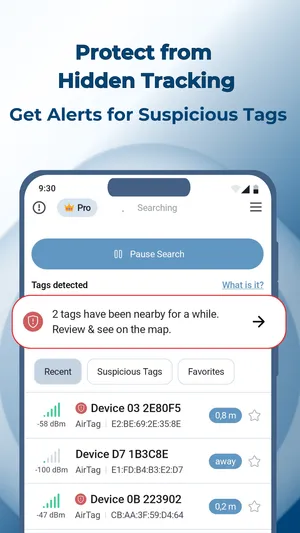
TFind is an Android app that scans over Bluetooth and warns you when an unknown AirTag, SmartTag or Tile keeps appearing near you across time and distance.
Updated September 22, 2026 · Published August 14, 2026
 Free to download · Android 8.0+ · contains ads & optional Pro (subscription or one-time)
TFind is a free Android app that finds hidden Bluetooth trackers near you — Apple AirTag, Samsung SmartTag and SmartTag+, and Tile. It runs on any Android 8.0+ phone and warns you when the same unknown tracker keeps turning up as you move.
Worried something is tracking you? An unknown Bluetooth tracker slipped into a bag or a coat pocket is hard to spot on your own. TFind scans the air around you and tells you which tags are there, and how close.
What “following you” actually means
A single tag you pass on the street isn’t a threat. TFind only raises a flag when the same tracker appears near you again later — by default at least 15 minutes and 200 metres apart. That gap is what separates a tag that’s travelling with you from the dozens you walk past every day.
How do I find hidden Bluetooth devices near me on Android?
Decide first which of the two questions you are asking, because the answers use different tools.
- “Which Bluetooth trackers are near me?” — that is TFind. It identifies AirTag, Samsung SmartTag / SmartTag+ and Tile from their Bluetooth LE service IDs, shows an estimated distance for each, and alerts you when one follows you. Scanning is free.
- “What Bluetooth devices are near me at all?” — a generic BLE scanner lists everything in earshot: headphones, watches, TVs, fitness bands, speakers. It cannot tell you which of them is a tracker, and a list of twenty gadgets answers nothing about being followed.
An unknown Bluetooth device is usually somebody’s earbuds. TFind is the narrow tool: it reads the three tracker families it can name and stays quiet about the rest. It cannot see Chipolo, Pebblebee or generic Find My clones, and it cannot identify a device that is not broadcasting.
If the long list is what you actually wanted, that is a different app and we say which one: which Bluetooth scanner app does which job. For the exact coverage rule and the full exclusion list, see which trackers TFind detects.
Finding where it’s hidden
- Open TFind and tap Start Scan (grant Bluetooth and Location).
- Check the flagged trackers and watch the distance band.
- Move slowly — the signal climbs as you get closer, so you can narrow down a bag, pocket or seat.
- Recognise a tag as your own? Add it to My Tags so it stops alerting.
Checking a car is its own job, and the alert threshold works in your favour there: see check your car for a hidden AirTag. If what you have is a name in your Bluetooth list rather than an alert, start with how to identify an unknown Bluetooth device on Android.
What works on Android — and what doesn't
Works on Android
- Scans for AirTag, Samsung SmartTag/+ and Tile over Bluetooth
- Flags a tracker as suspicious only after it's seen near you twice, at least 15 minutes and 200 m apart — so a stranger's tag on the same train doesn't cry wolf
- Shows a distance band so you can work out where a flagged tag is hiding
- Mark your own trackers as My Tags so they stop setting off alerts
Honest limits
- It reads AirTag, SmartTag and Tile only — not Chipolo, Pebblebee or generic Find My clones
- Bluetooth only reaches ~5–10 m and walls block it; an AirTag rebroadcasts about every 15 minutes, so a scan can miss it and catch it on the next pass
- An AirTag sitting next to its owner's iPhone stays almost silent by Apple's design — TFind spots separated or unknown tags
- Continuous background checking keeps a notification running; it can't scan silently when you close it
On iPhone? TFind is Android-only. On iPhone, use Apple's built-in tracker-detection and Find My safety alerts to check for unknown AirTags.
FAQ
- How do I check for an iPhone user's AirTag with an Android phone?
- Scan with TFind on your Android phone. TFind reads the AirTag's Bluetooth signal directly, so you need no iPhone and no Apple account. There is one honest catch. Apple keeps an AirTag almost silent while it sits next to its owner's iPhone. So you will usually see only a tag that someone left on its own, or one that is following you.
- How does TFind know a tracker is following me?
- It watches for the same tag turning up near you more than once, spread out in time and place — at least 15 minutes and 200 m apart by default — rather than a tag you just walked past once.
- Will it catch every hidden tracker?
- No. TFind detects Apple AirTag, Samsung SmartTag/SmartTag+ and Tile. It can't see Chipolo, Pebblebee or generic Find My clones, and it can't detect a tag that isn't actively broadcasting.
- Does it need to run in the background?
- For ongoing checks, yes — TFind runs a foreground scan with a visible notification. It doesn't scan silently after you close it, and leaving it running uses battery.
- Another Android app lists 20 nearby Bluetooth devices and TFind shows 2. Why?
- Those apps list every Bluetooth device in earshot — headphones, watches, TVs, speakers. TFind reads only the three tracker families it can identify: Apple AirTag, Samsung SmartTag and SmartTag+, and Tile. The shorter list is the point. A long roll of gadgets tells you nothing about whether a tracker is following you.
- TFind found several AirTags near me on Android — is someone tracking me?
- Probably not. A tag showing up in a scan does not mean it is following you. In a block of flats or an office you walk past other people's AirTags all day. TFind flags a tracker only after it sees the same one twice, at least 15 minutes and 200 metres apart. Until that happens, treat a detection as normal.