
Find a nearby AirTag — on Android
TFind is an Android app that finds a nearby Apple AirTag over Bluetooth and can play a sound on a separated AirTag to help you locate it.
By Alex S, DreamTeam Mobile · Updated August 14, 2026
 Free to download · Android 8.0+ · contains ads & optional Pro (subscription or one-time)
TFind is a free Android app that finds a nearby Apple AirTag over Bluetooth. It runs on any Android 8.0+ phone, needs no iPhone and no Apple ID, and can play a sound on an AirTag that is away from its owner. Scanning is free; Pro adds the map and unlimited sound plays.
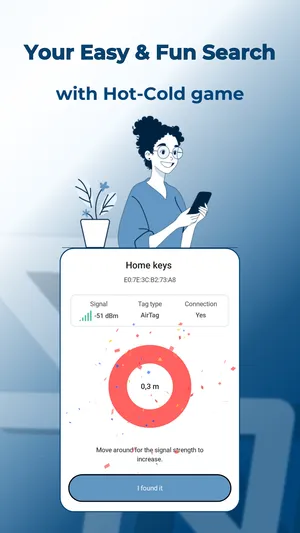
Dropped your keys behind the sofa, or left a bag somewhere with an AirTag tucked inside? TFind listens for the AirTag over Bluetooth, shows how close you are, and — if the tag is on its own — plays a sound so you can follow your ears to it.
Track it down
- Open TFind and tap Start Scan, then allow Bluetooth and Location.
- Find your AirTag in the list and watch the distance band climb as you get warmer.
- If it’s separated from its owner, tap Play Sound and follow the beep — even under a cushion or inside a bag.
- Add the tag to My Tags so it won’t show up as a stranger’s tracker later.
Using an Android app to detect AirTags
TFind is an Android app that detects Apple AirTags over Bluetooth. You don’t need an iPhone or an Apple account for it. Open the app, scan, and every AirTag broadcasting nearby appears in the list with an estimated distance.
Two different worries bring people here, and they need different answers:
- The AirTag is yours and you’ve lost it. That’s this page — scan, walk toward the tag, and beep it once it’s separated from its owner.
- The AirTag isn’t yours and you think it’s travelling with you. Read detect a hidden Bluetooth tracker following you on Android instead. TFind only flags a tracker after it has seen it near you twice, well apart in time and place.
How to check for an iPhone tag with an Android phone
People often call an AirTag an iPhone tag or an Apple tag, because it is set up from an iPhone. You do not need one to check for it. TFind reads the tag’s Bluetooth advertisement on your Android phone, so scanning takes an Android 8.0+ device and nothing else — no Apple ID, no pairing, no charge.
Two limits are worth stating plainly, because they decide what a scan shows:
- An AirTag stays almost silent while the iPhone that owns it is close by. A test with your own tag on the same table usually shows nothing. Move the tag away from its iPhone first.
- An AirTag rebroadcasts about every 15 minutes, so leave the scan running for a minute before you decide the tag is not there.
If the worry is a stranger’s tag rather than a lost one, read detect a hidden Bluetooth tracker following you on Android — that page covers the alert rule TFind uses to tell “followed” from “walked past”.
When the beep won’t play
Apple keeps an AirTag silent while its owner’s iPhone is close by, so TFind can only sound a tag that’s been left on its own. The first three plays are free; after that, sounding tags is part of Pro.
What works on Android — and what doesn't
Works on Android
- Scans for Apple AirTags near you and shows how close each one is
- Plays a sound on an AirTag that's away from its owner, so you can hear where it is — 3 plays free, then Pro
- Works on any Android 8.0+ phone; you don't need an iPhone or an Apple account
- Save your own AirTags as My Tags so alerts leave them alone
Honest limits
- Distance comes from signal strength, so it jumps around — treat it as warmer/colder, not a map pin
- An AirTag sitting next to its owner's iPhone stays quiet and can't be sounded; TFind can beep it only once it's separated
- No ultra-wideband precision finding — TFind walks you closer, it doesn't point an exact arrow like an iPhone does
- Bluetooth reaches ~5–10 m and an AirTag only rebroadcasts about every 15 minutes, so move around and give it a moment
On iPhone? TFind is Android-only. If you have an iPhone, use Apple's own Find My app to locate your AirTag.
FAQ
- What app detects Apple AirTags on Android?
- TFind does. It is an Android app that scans over Bluetooth for Apple AirTags nearby and shows how close each one is. It runs on any Android 8.0+ phone, and it also detects Samsung SmartTag, SmartTag+ and Tile.
- Can I make my AirTag ring from an Android phone?
- Yes, if the AirTag is separated from its owner. TFind connects to it and plays a sound — three times for free, then it's a Pro feature. An AirTag next to its owner's iPhone can't be sounded.
- Do I need an iPhone or an Apple ID?
- No. TFind reads the AirTag's Bluetooth signal directly, so it runs on any Android 8.0+ phone with no Apple account.
- Why can't I hear my AirTag?
- If its owner's iPhone is nearby, Apple keeps the tag quiet by design. TFind can beep an AirTag only when it's on its own.
- Why doesn't TFind detect my own AirTag on Android when it's right next to me?
- An AirTag goes almost silent while the iPhone it belongs to is close by. Apple designed it that way, and the tag also rotates its Bluetooth ID. TFind finds AirTags that are away from their owner, or that belong to a stranger. So a test at home, with that iPhone in the next room, often shows nothing. Move the AirTag away from its iPhone and scan again.
- Can I pair or set up an AirTag from an Android phone?
- No. Apple does not let any Android app pair, rename or manage an AirTag. TFind reads what a nearby AirTag broadcasts over Bluetooth, and nothing else. The rival Android detectors we compare state the same limit.
- How do I check for an iPhone tag with an Android phone?
- An iPhone tag is an Apple AirTag. Install TFind on your Android phone and tap Start Scan. It reads the AirTag's Bluetooth signal directly, so you need no iPhone and no Apple ID. Scanning is free. One catch comes from Apple's design. An AirTag next to the iPhone that owns it broadcasts almost nothing. You will usually see a tag that is away from its owner.