
How to find an AirTag with a Google Pixel phone
TFind is an Android app that runs on any Google Pixel phone and finds nearby Apple AirTags, Samsung SmartTags and Tile trackers over Bluetooth — no iPhone needed.
Updated October 8, 2026
 Free to download · Android 8.0+ · contains ads & optional Pro (subscription or one-time)
A Google Pixel can find a nearby AirTag, and you do not need an iPhone. First use the scan your Pixel already has. Then use TFind, a free Android app, to walk to the tag: it shows a distance band and names AirTag, Samsung SmartTag and Tile in one list.
Step 1: the scan your Pixel already has
Android has a tracker scan built in, and a Pixel gets it straight from Google.
- Open Settings.
- Tap Safety & Emergency.
- Tap Unknown tracker alerts.
- Tap Scan now.
Google says the scan takes about 10 seconds. It finds trackers that are near you and away from their owner’s phone. Your Pixel also sends alerts on its own when an unknown AirTag moves with you.
The built-in scan answers one question: is a tracker near me? It does not help you find the tag.
Step 2: walk to the tag with TFind
- Install TFind from Google Play and allow Bluetooth and location. Android needs location permission for every Bluetooth scan.
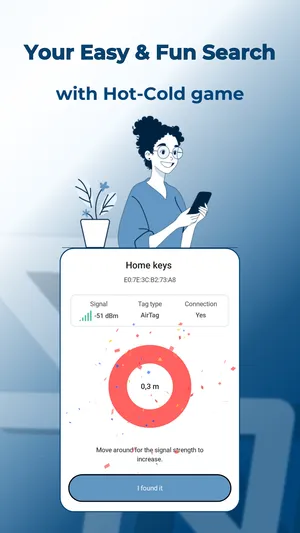
- Tap Start Scan. Each AirTag, SmartTag and Tile in range shows with a distance band.
- Walk slowly. When the band gets closer, you are going the right way. Bluetooth reaches about 5 to 10 metres and walls block it.
- If the list is empty, move and scan again. An AirTag away from its owner broadcasts about every 15 minutes, so one scan can miss it.
- To hear it, tap the AirTag and play a sound. The first three plays are free.
Why a Pixel Pro cannot point to an AirTag
Some Pixels have ultra-wideband. Google lists it on the Pixel 8 series and newer, Pro models only. Ultra-wideband is the radio that shows an arrow to a tag. But it only works when the phone and the tag both support it and the tag’s maker allows it. Apple keeps AirTag precision finding for the iPhone.
So on every Pixel, Pro or not, an AirTag search uses Bluetooth signal strength. That gives you warmer and colder, not an arrow. TFind shows it as a distance band. It is enough to find a tag in a room or a car, but it takes a few steps.
Google’s own tags are a different job
Google sells its own Pixel Tag. TFind does not detect it, and it does not detect other tags on Google’s Find Hub network. TFind reads three families only: Apple AirTag, Samsung SmartTag and Tile. For Google’s tags, the Pixel’s built-in Scan now is the right tool. The full list of what TFind reads is on which trackers TFind detects.
Related pages
- How to find an AirTag with a Samsung phone — the same task on a Galaxy
- Find a nearby AirTag on Android — the full walk-to-it method
- Detect Google Find Hub trackers on Android — what to do about Google’s network
- How to find hidden Bluetooth trackers on Android — if you think a tag is following you
What works on Android — and what doesn't
Works on Android
- Runs on every Google Pixel with Android 8.0 or newer — the same TFind and the same scan as on any other Android phone
- Picks up where the Pixel's built-in Scan now stops: a distance band to walk toward, and AirTag, SmartTag and Tile named in one list
- Can beep an AirTag that is away from its owner, so you can follow the sound on a Pixel
Honest limits
- A Pixel Pro has ultra-wideband, but AirTag precision finding works only between an AirTag and an iPhone. No app can turn a Pixel into an AirTag pointer
- TFind does not detect Google's own Pixel Tag, or other tags on Google's Find Hub network. Use the Pixel's built-in Scan now for those
- An AirTag next to its owner's iPhone stays almost silent by Apple's design, so a Pixel cannot see it until the two are apart
- TFind cannot show who owns a tag. A Bluetooth broadcast carries no owner name
On iPhone? TFind is Android-only. On an iPhone, Apple's Find My warns about an unknown AirTag and can use Precision Finding to point to it.
FAQ
- Can a Google Pixel find an AirTag?
- Yes. A Pixel can scan for a nearby AirTag over Bluetooth. Android's built-in scan tells you a tracker is near. TFind, a free Android app with ads, shows how close the AirTag is so you can walk to it. A Pixel cannot point an arrow at an AirTag; that needs an iPhone.
- Where is the tracker scan on a Pixel?
- Open Settings, then Safety & Emergency, then Unknown tracker alerts, and tap Scan now. Google says the scan takes about 10 seconds. It finds trackers that are near you and away from their owner's phone. On Android 11 and newer, the scan does not need Location to be on.
- My Pixel 8 Pro has ultra-wideband. Can it find an AirTag precisely?
- No. Apple's precision finding for AirTag works only with an iPhone that has ultra-wideband. On a Pixel Pro, ultra-wideband works with tags built for it, such as Google's Pixel Tag. For an AirTag, a Pixel uses Bluetooth signal strength, and TFind turns that into a distance band.
- Does TFind find a Google Pixel Tag?
- No. TFind reads three tracker families: Apple AirTag, Samsung SmartTag and Tile. A Pixel Tag is none of them. Use the Pixel's built-in Scan now for Google's own tags.
- Is it free on a Pixel?
- Yes. TFind is free to download and the scan is free, with ads. Pro removes the ads and adds the map, unlimited sound plays and unlimited device tracking.